
Lightsail Bucket, CloudFront & Nginx: Maximum Cost Efficiency for Small Projects
Because Lightsail uses a fixed monthly pricing model, its outbound traffic is also capped.
For Lightsail instances, this is actually pretty generous — for example, a 2GB memory instance comes with 3TB of outbound traffic, which is more than enough for most small or medium-sized projects.
However, the situation is very different when it comes to Lightsail object storage (Buckets). The outbound traffic included with buckets is honestly tiny. If you choose the 5GB bucket plan (which is suitable to store images for many personal projects), you only get 25GB of outbound traffic per month. For large assets like images or videos, this is absolutely not enough.
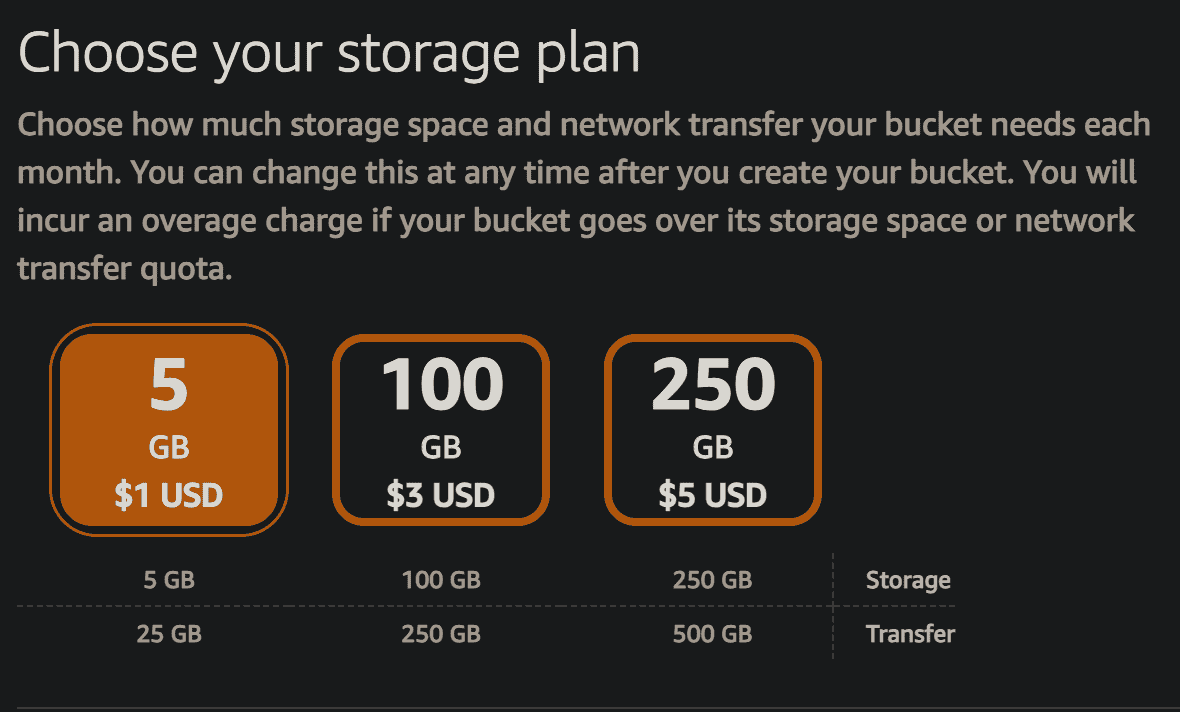
What I ended up doing is using CloudFront to get around that 25GB limitation. CloudFront has a free plan that includes 100GB of data transfer, and that bandwidth can actually take the “real” traffic from users.
Here’s the idea: I install Nginx on my Lightsail instance. When a user requests an image, Nginx reverse-proxies that request to my CloudFront URL. If CloudFront doesn’t have that image cached yet, it will fetch it one time from my Lightsail bucket, and then cache it at the CloudFront edge locations. After that, when another user in the same region requests the same image, CloudFront serves it directly from the cache—fast for the user, and it doesn’t keep draining my bucket’s tiny outbound quota.
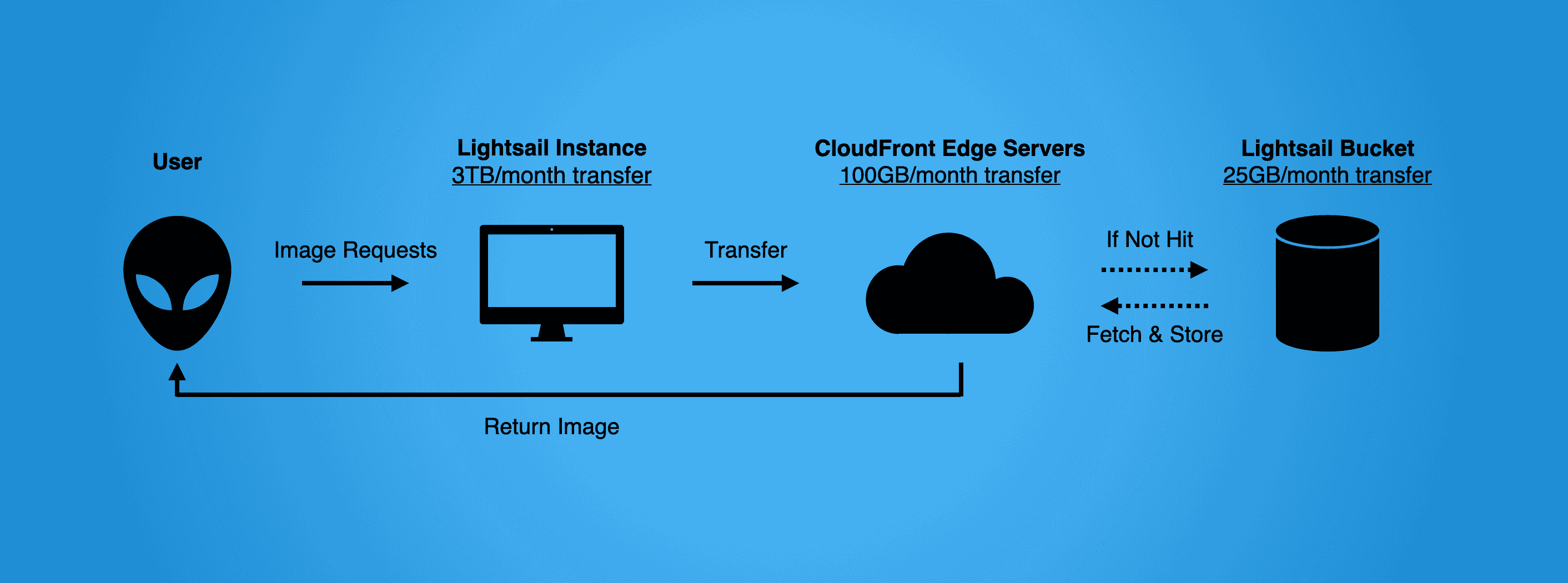
So effectively, CloudFront’s 100GB is doing the heavy lifting for image delivery, while the Lightsail bucket’s 25GB is mostly just used for CloudFront-to-origin fetches. In practice, this feels like “turning” that bucket’s 25GB into a much more efficient 100GB of delivery bandwidth—and it’s basically free.
Setting up CloudFront is also not that hassle. First, creating a CloudFront Distribution (choose the free plan), and then creating an origin inside that distribution.
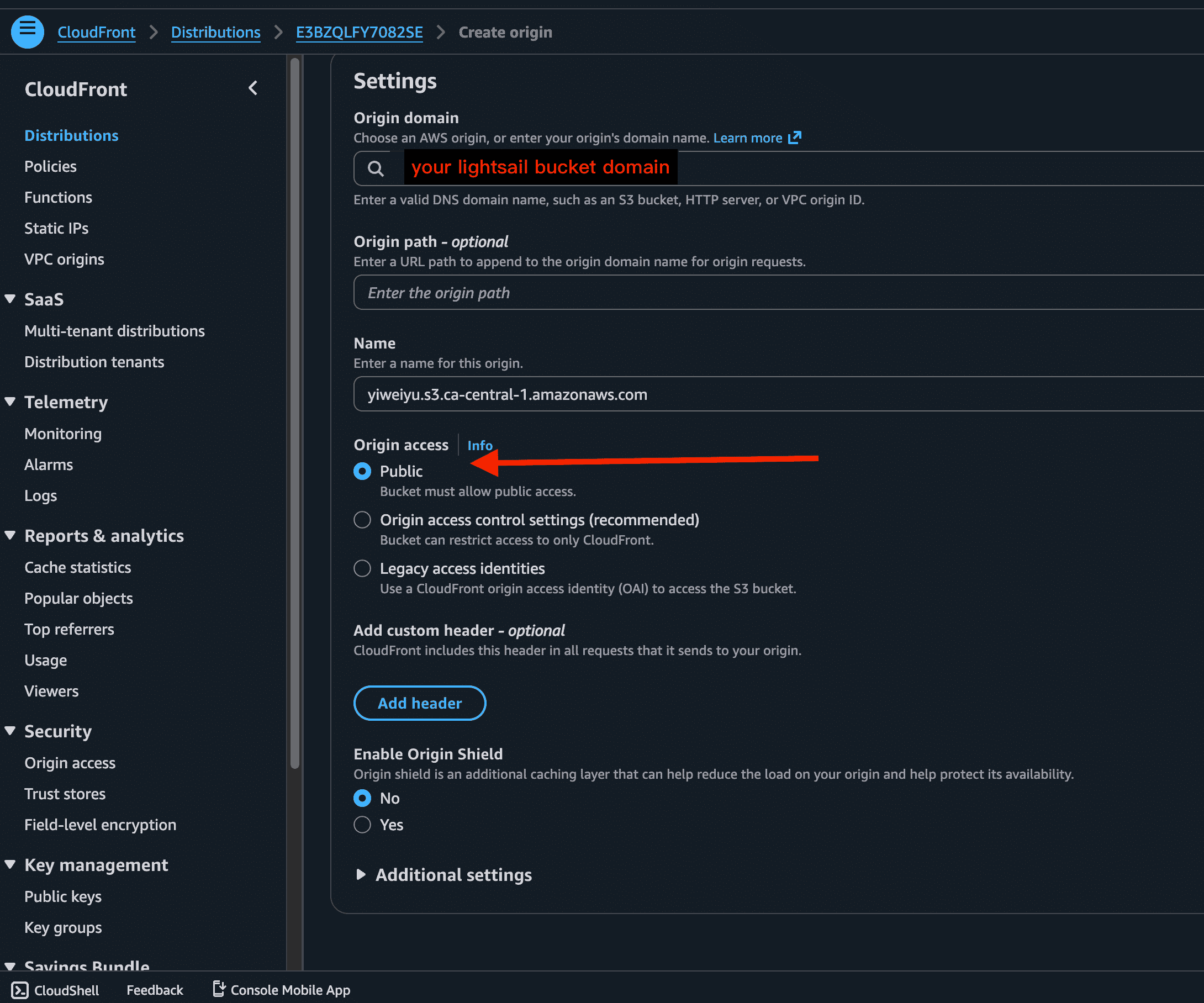
Then, in Nginx, configure the file /etc/nginx/sites-available/default, add a new reverse proxy rule, so any incoming requests that are meant for the bucket get reverse-proxied to the CloudFront domain:
server {
    location /bucket/ {
       limit_req zone=ip_limit burst=30 nodelay;

       proxy_pass https://your-address.cloudfront.net/; # CloudFront 分发地址

        proxy_ssl_server_name on;
        proxy_ssl_name your-address.cloudfront.net;

        # 设置必要的头部信息
        proxy_set_header Host your-address.cloudfront.net;
        proxy_set_header X-Real-IP $remote_addr;
        proxy_set_header X-Forwarded-For $proxy_add_x_forwarded_for;
        proxy_set_header X-Forwarded-Proto $scheme;
    }
}
Additionally, to make this safer, when save images into the bucket, it's better to standardize the URL format, so all image URLs live under one consistent path—this way Nginx can match that path and route the requests cleanly:
    @Value("${aws.s3.bucket-name}")
    private String bucketName;

    @Value("${aws.s3.nginx-forwarding}")
    private String Nginx;

    @Value("${aws.s3.temporary-folder}")
    private String temporaryFolder;

    @Value("${aws.s3.formal-folder}")
    private String formalFolder;

    // 异步保存文章图片
    @Async
    public void saveArticleImages(String username, String category, String articleTitle, List<String> tempImages) {
        String targetFolder = formalFolder + username + "/" + category + "/" + articleTitle + "/";

        for (String tempImage : tempImages) {
                // 从完整 URL 提取出 S3 的 Key。因为S3的API不接受完整 URL!!!只接受相对路径!!!傻逼bug日死他妈了!!!
                String key = tempImage.substring(tempImage.indexOf("Blog/"));
                String fileName = key.substring(key.lastIndexOf("/") + 1);
                String targetKey = targetFolder + fileName;

                // 检查文件是否存在
                ListObjectsV2Request listObjectsRequest = ListObjectsV2Request.builder()
                        .bucket(bucketName)
                        .prefix(key)
                        .build();
                ListObjectsV2Response listObjectsResponse = s3Client.listObjectsV2(listObjectsRequest);

                // 只有文件存在时才执行后续逻辑
                if (!listObjectsResponse.contents().isEmpty()) {
                    CopyObjectRequest copyObjectRequest = CopyObjectRequest.builder()
                            .sourceBucket(bucketName)
                            .sourceKey(key)
                            .destinationBucket(bucketName)
                            .destinationKey(targetKey)
                            .acl(ObjectCannedACL.PUBLIC_READ)
                            .build();

                    s3Client.copyObject(copyObjectRequest);

                    logger.info("Successfully moved image from {} to {}", key, targetKey);
                } else {
                    logger.info("File does not exist in S3: {}", key);
                }
        }
        // 发布保存事件
        transactionService.publishSaveEvent(username, articleTitle);
    }
One important thing to note: The Lightsail bucket must keep public, otherwise CloudFront won’t be able to fetch objects from it.
Once everything is done, refresh the page and send a few image requests to verify the responses are actually hitting CloudFront’s cache:
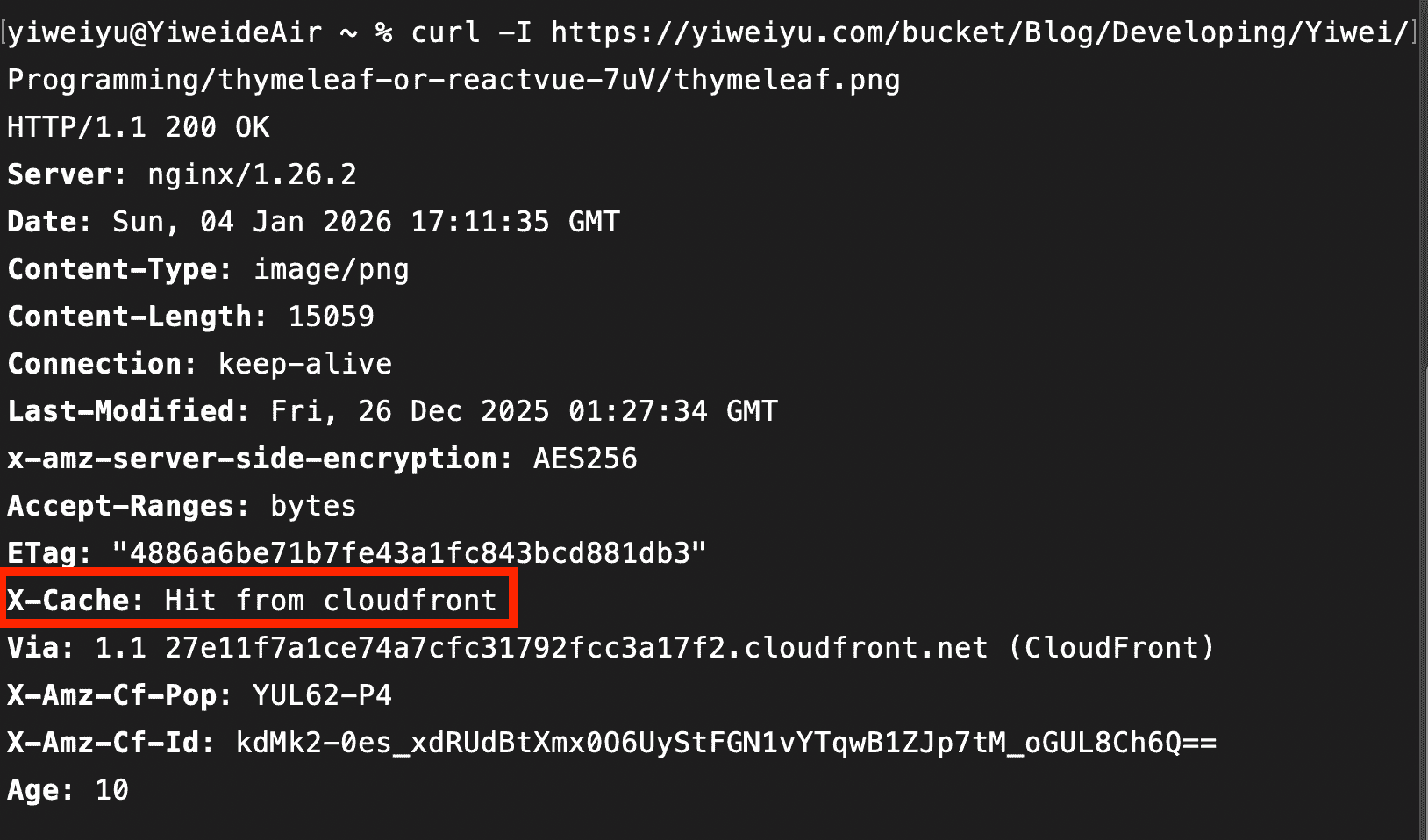
Hit!
That said, if you think all this setup is too annoying, there’s an easier option: just use Lightsail’s built-in Distribution feature. You don’t really need to configure much, it’s about 2.5 US-dollars per month, but you only get 50GB of outbound transfer.
For me, the Nginx + CloudFront combination is the most cost-efficient solution for small projects — a bit more setup, but much better value in the long run.